A handover is a sequence of verified changes, not a single exchange of passwords. Plan it before completion so the buyer can check the agreed assets and members can continue using the service with minimal disruption.
Confirm the provider process before promising dates
Ask Whop to confirm the process for your specific company, products and account relationships. Do not assume an Owner team role, a membership-transfer link or a new bank destination accomplishes the same thing as transferring the business. Those are different operations with different consequences.
Confirm the process for each other dependency: community platform, domain registrar, hosting, licensed software and suppliers. Record required approvals and expected sequencing. Provider requirements can change, so reconfirm them when preparing the actual transfer.
Build a handover sequence
- Freeze the agreed scope. List included assets, exclusions and delivery tests in the current version.
- Prepare permitted access. Use named buyer accounts and supported invitation or transfer mechanisms.
- Coordinate the change. Schedule dependencies and communicate service changes honestly to members where appropriate.
- Demonstrate operations. Walk through routine delivery, support and reporting without exposing unnecessary personal information.
- Test as the buyer. Confirm the buyer can perform the agreed tasks with their own authorised access.
- Record remaining issues. Separate delivered items from items awaiting correction.
Keep security and privacy in the plan
Do not send personal account passwords, recovery codes or API keys through ordinary marketplace messages. Use the provider’s supported transfer process and a separately agreed secure method where sensitive material must move. Rotate or revoke obsolete access at the appropriate agreed point, after confirming continuity.
Customer and member data needs particular care. Transfer only what is necessary and permitted. A purchase agreement does not make every possible export appropriate. Get qualified advice where privacy or contractual obligations are unclear.
Use inspection to test delivery, not to infer acceptance
In BizAcquir’s current workflow, inspection begins only after seller delivery, a handover checklist check and the buyer’s explicit acknowledgment of access. The default inspection period is seven calendar days, with the exact deadline shown in the deal. Starting inspection is separate from accepting the handover.
Keep a test log against the agreed checklist. If a material obligation changes, the version must change and acceptance must refer to that current version. Report an issue promptly rather than waiting for a countdown. Deadline expiry and buyer silence do not authorise ordinary payout.
Close the loop deliberately
The buyer confirms acceptance through the existing confirmation step when the agreed handover is complete. Ordinary seller payout still requires the other transaction conditions and no unresolved dispute; the completed payment is recorded in the deal.
A mutually accepted settlement is a separate path, not a way to pretend an incomplete handover was accepted. Keep the deal history, evidence and agreed remedies distinct. No guide can promise that every third-party account, subscription or contract will transfer; resolve those facts for the actual business before committing to the sale.
Build a handover checklist around dependencies
Start with the current agreed asset version. For every item, record the responsible person, provider requirement, planned order, test and outcome. Use “blocked” or “needs correction” when appropriate; an unchecked item is more useful than a premature completion mark.
| Stage | Practical check | Evidence of completion |
|---|---|---|
| Prepare | Confirm provider processes, named buyer accounts and included rights. | Agreed instructions and asset schedule. |
| Deliver | Use the supported transfer or invitation sequence. | Recorded outcome for each asset, without secret values. |
| Demonstrate | Run a routine delivery and support task together. | Buyer can follow the operating instructions. |
| Inspect | Buyer tests the current checklist with their own access. | Results and unresolved issues recorded in the deal. |
| Accept | Buyer deliberately confirms the completed current version. | The explicit acceptance record, not elapsed time. |
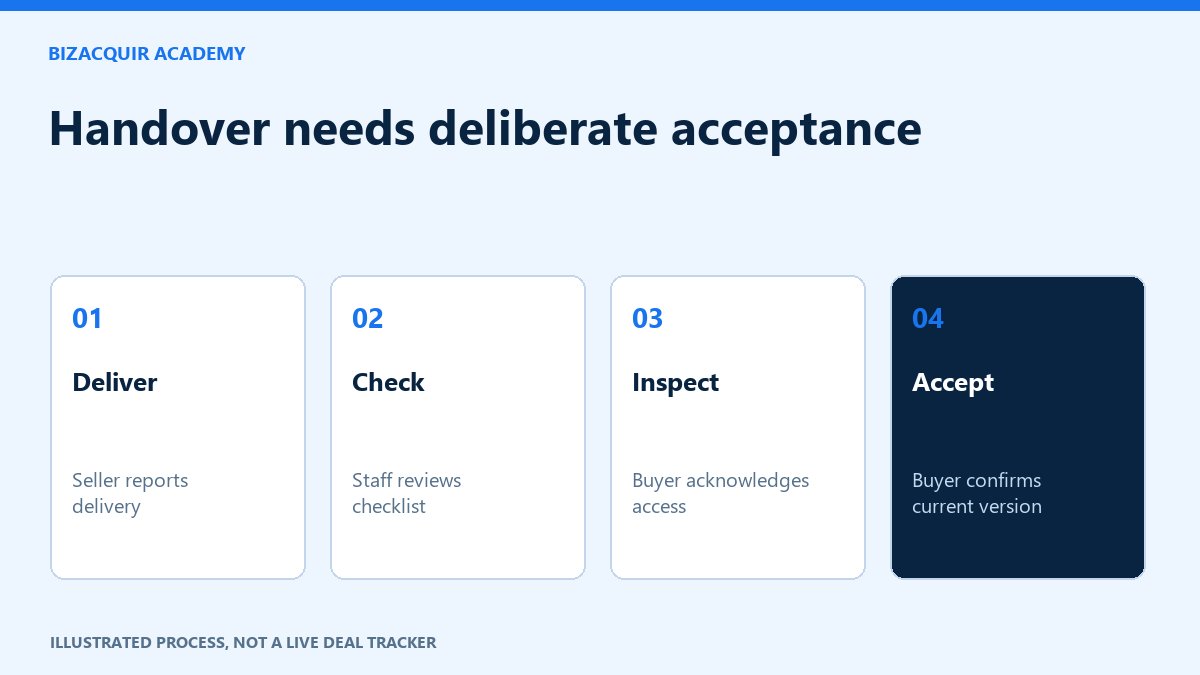
Original handover diagram distinguishing seller delivery, staff checks, buyer inspection and explicit acceptance.
Test continuity with a realistic exercise
For a hypothetical education community, the buyer could locate next week's lesson, prepare a draft announcement, find the support procedure and identify how a membership-access problem would be handled. Use a reversible draft or authorised test action; do not send a real broadcast or collect a payment just to demonstrate control.
Test dependencies in order. A branded support address might rely on the domain and email provider. A scheduled lesson might depend on a video-hosting licence. A community bot may stop working when the seller removes an old account. Identify those links before revoking access, then confirm the replacement works at the agreed point.
Handle a failed test without losing the record
Record the expected result, actual result, affected asset and next responsible action. For example: “The buyer can open the course archive but cannot publish the next scheduled lesson using their named account.” This is more useful than “access is broken.” Add only the evidence needed to explain the failure; omit private member information and secret values.
If a material obligation changes, update the agreed checklist version and obtain the necessary fresh confirmations. Do not mark the old checklist accepted to make progress appear complete. In BizAcquir, report a dispute promptly when needed; evidence can follow, and an unresolved dispute blocks ordinary payout.
Before final acceptance
- The buyer is checking the current asset version.
- Critical operating tasks work with the buyer's authorised access.
- Included files, rights and agreed transition work are accounted for.
- Unresolved issues are recorded and handled through the agreed process.
- Obsolete access is addressed without disrupting members.
- The buyer understands that starting inspection and accepting handover are different actions.
Retain the final record. A later complaint or remedy should add to the history rather than rewrite what was accepted or what money was recorded.
Your next step
Ready to prepare your sale? Sell your Whop business or get a free valuation. Create an account or sign in to view your private estimate.
Sources and useful references
- Whop: access roles
- Whop: confirm account-specific transfer requirements
- BizAcquir: inspection and assisted handover
Agree what demonstrates a successful handover
Choose observable checks for each included asset: access works, the documented process can be followed and outstanding obligations are assigned as agreed. A welcome message or an ownership label alone is not enough. If a provider must approve a change, identify that dependency before choosing a completion date.
Run demonstrations with permitted access and synthetic examples where appropriate. Keep member data and credentials out of public material. The buyer’s explicit acceptance remains separate from silence, a timer expiring or the seller saying everything is finished.